


Become a job‑ready Power Platform Functional Consultant. In this hands‑on program, you’ll learn to design solutions with Dataverse, Power Apps (canvas & model‑driven), Power Automate, and environment management—the exact skills measured on Microsoft’s PL‑200 certification exam.
Format: Live online • Level: Intermediate • Capstone: End‑to‑end business solution • Certificate: Course completion + exam guidance (PL‑200)
Who this course is for
- Aspiring/early‑career Functional Consultants, Business Analysts, and Power Users who translate business requirements into Power Platform solutions.
- IT professionals (SRE, automation, M365 admins) looking to add low‑code delivery skills.
- Developers who want to accelerate solution delivery with low‑code + ALM.
Prerequisites
- Comfort with business processes and basic data concepts. Familiarity with the Power Platform helps, but no formal prerequisite exam is required (PL‑900 recommended but not mandatory).
What you’ll be able to do (mapped to PL‑200 “skills measured”)
By the end, you can:
- Configure Microsoft Dataverse: model data, manage tables/columns/relationships, and implement security/ownership strategies.
- Create apps with Power Apps: build user‑friendly model‑driven and canvas apps with responsive UX and modern commanding.
- Create & manage logic and process automation: design cloud flows, approvals, and business process flows with robust error handling.
- Manage environments: work with solutions, environment strategy, governance, and deployment practices aligned to ALM.
Course syllabus (8 modules + capstone)
Module 1 — Foundations & Environment Setup
Understand Power Platform architecture, environments, and solutions. Set up your developer environment and lab prerequisites. (Includes exam sandbox walkthrough.)
Module 2 — Working with Dataverse
Create tables, columns, relationships; choices; data import; auditing; ownership, teams, and business units; security roles and hierarchical access. Hands‑on labs mirror official instructor‑led labs.
Module 3 — Model‑Driven Apps
Designing site maps, forms, views, command bar (modern commanding), custom pages, and data validation.
Module 4 — Canvas Apps
Power Fx essentials, connectors, responsive layouts, accessibility, component libraries, and embedding techniques.
Module 5 — Power Pages (intro)
Portal architecture, authentication basics, exposing Dataverse data safely, and simple site customization. (Included at awareness/practical level as seen in the exam description.)
Module 6 — Automation with Power Automate
Cloud flows, approvals, solution‑aware flows, error handling/retries, pagination, concurrency, and governance.
Module 7 — Logic, Policies & ALM
Business rules, business process flows, environment strategy (Dev/Test/Prod), solutions, connection references, and deployment pipelines.
Module 8 — Governance, Security & Administration
DLP policies, monitoring, auditing, maker onboarding, application lifecycle management best practices for functional
Capstone Project — From requirements to production‑ready
Work with a realistic business scenario: capture requirements, model Dataverse, build a model‑driven app + canvas component, automate a process, and package/deploy with solutions. Labs reference the public PL‑200 lab structure for continuity.
How the course works
- Live sessions: Weekly instructor‑led workshops (recorded for replay).
- Hands‑on labs: Guided exercises aligned to Microsoft Learning’s PL‑200 lab framework.
- Mentor hours: Office hours for design reviews and troubleshooting.
- Community: Private group for Q&A, feedback, and peer support.
Certification & exam information
- Certification: Microsoft Certified: Power Platform Functional Consultant Associate (earned by passing Exam PL‑200).
- Passing score: 700 (on a 100–1000 scale).
- Price: Typically US$165 (varies by location and tax).
Useful links:
- Official exam page: Exam PL‑200 on Microsoft Learn
- Study guide & “skills measured”: PL‑200 Study Guide (Microsoft)
- Public lab index (reference): PL‑200 Labs by Microsoft Learning
Frequently asked questions
Is PL‑900 required before PL‑200?
No formal prerequisites. PL‑900 is helpful if you’re brand‑new to Power Platform, but it isn’t required. [learn.microsoft.com]
Will this course alone make me pass?
You’ll get the skills that map to the exam plus exam‑day tips. Plan to allocate extra practice time and review the official study guide and practice assessment. [learn.microsoft.com], [learn.microsoft.com]
Do you cover Power Pages and governance topics?
Yes—Power Pages at a practical level for PL‑200 awareness, and governance/ALM to ensure you can manage environments and ship with solutions (both map to the exam blueprint). [learn.microsoft.com]
Instructor
Chamara Priyadarshana — Senior Site Reliability Engineer & Microsoft 365/Power Platform practitioner. Designs and automates solutions across Microsoft 365, Exchange Online, Teams, and Power Platform with a focus on real‑world, scalable delivery.
Dataverse
The Community Power Apps plan lets you try out aspects of Power Apps and Dataverse but you can’t use it for productions solutions and you can’t publish and share any Power Apps you create in this environment.
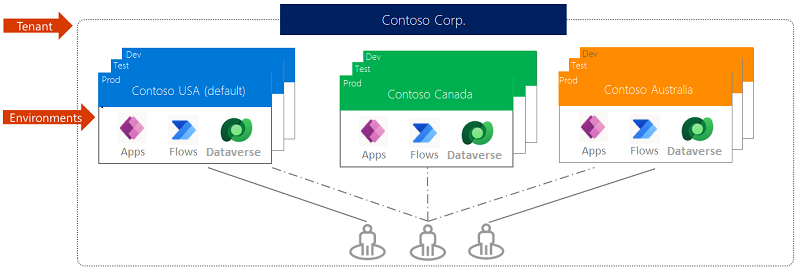
An environment is a way to create and manage an instance of a Dataverse database. It also lets you manage user access, security settings, and the storage that is associated with the Dataverse database within that environment.
Power Apps Developer plan: Explore Power Platform at full potential for learning at no cost.
A developer environment:
- Doesn’t require a paid license.
- Permits you to explore Power Platform capabilities.
- Includes Microsoft Dataverse.
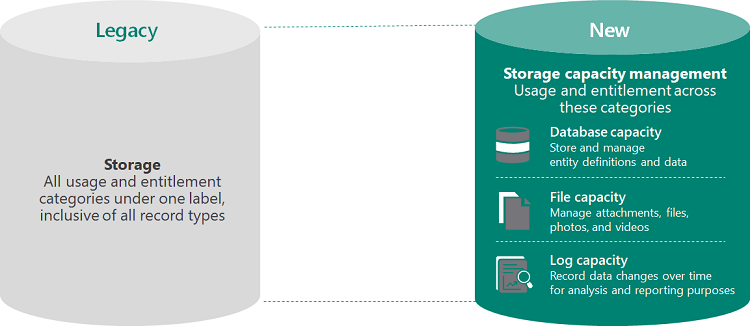
- Doesn’t consume the tenant’s capacity.
- Has a maximum Database size of 2 Gb.
- Can be a managed environment.
- Must not be used for production purposes.
Each user can have up to three Developer environments.
A Power Platform admin can create Developer environments for other users and can restrict users from creating their own Developer environments.
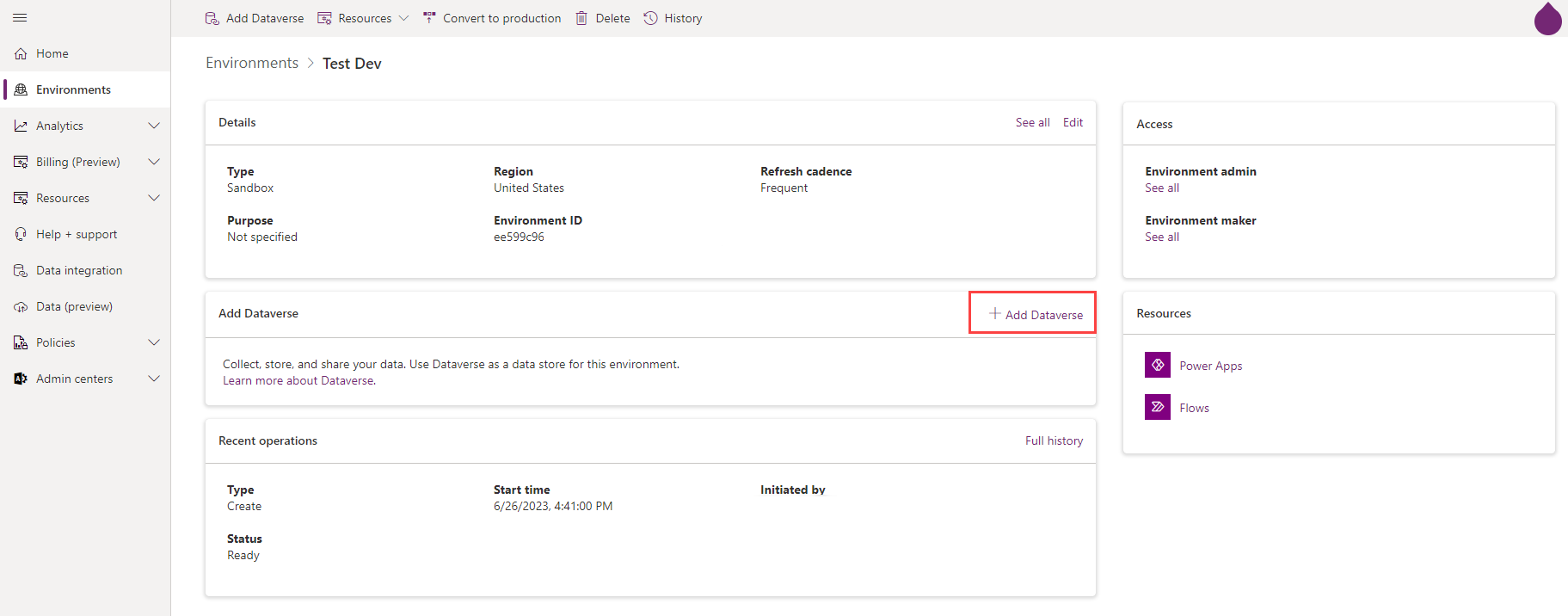
Once you create an environment with Dataverse in it, you can access that Dataverse data from other environments as well. Dataverse creation with an environment reserves up to 1 GB in storage.
A use case with only one instance of Dataverse for two environments could be when you have a development environment and a testing environment.

Under “Open access” at the top, you can also opt for None, providing unrestricted access across your tenant (if you want all tenant users to be able to access this environment).
How to add Dataverse to an existing environment?
The two environment roles that are built into every environment are System Administrator and Environment Maker. All other roles are user security roles.
When you configure or edit an environment, you can change the environment from:
- Production to sandbox.
- Sandbox to production.
You can also convert a Trial environment to Production.
You can delete an environment to recover storage space & to remove personal data.
You can recover a recently deleted environment within seven days of deletion.
You can reset a sandbox environment to delete and re-provision it. (You cannot reset a production environment.)
You can copy data between environments. (Everything or Customizations and schemas only)
- You can only copy to an environment in the same tenant and region.
- You can’t copy to a production environment.
- Components that aren’t added to a solution (including canvas apps, flows, custom connectors, and connections) might not be part of the copy.
- You can’t copy from or to a default or trial type environment.
- Copy and restore operations can take up to 8 hours unless much data, including audit data, needs to be copied or restored, in which case they could take up to 24 hours.
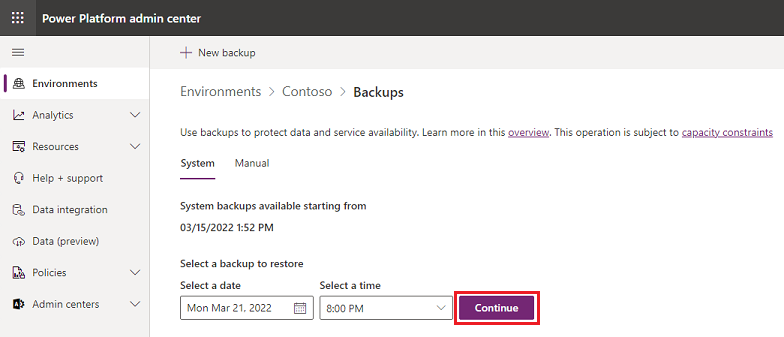
If you use Microsoft Power Platform to create production environments that have a database and Dynamics 365 applications enabled, you can benefit from the system backups that are automatically performed for those environments. The system backups are stored for up to 28 days.
For environments that don’t have Dynamics 365 applications enabled, the default backup retention period is only seven days. However, for managed environments, admins can use PowerShell to change the setting and extend the backup retention period. The available options are 7, 14, 21, and 28 days.
All environments, except Trial environments, are backed up.
- A backup is created for you when Microsoft updates your environment.
- You can back up production and sandbox environments.
- You can back up developer environments.
- You can’t back up the default environment.
- Sandbox backups are retained for up to seven days.
- Developer backups are retained for up to seven days.
- Manual backups for production environments that are created with Dataverse and Dynamics 365 applications enabled are retained up to 28 days.
To restore to a production environment, you must first change its type to sandbox.
You can set a sandbox, production, or trial (subscription-based) environment in administration mode so that only users with System Administrator or System Customizer security roles are able to sign in to that environment.
You can optionally disable background operations such as all asynchronous operations including Dataverse workflows and email server-side synchronization.